Modifying Sprites
If you would like to add new collars, head to Palette Maps for more information.
Important
This page does not cover adding new clan symbols or spritesheets.
Navigating the Files
Spritesheets can be found in the sprites folder and their matching DATA can be found in sprites/dicts. The DATA is how we control the creation of individual sprites off of the spritesheet. The sprites and pelts scripts pull all of their information from the DATA file.
Adding to the Spritesheet
Warning
For adding cat-colors, and modifing sprites, read the Pelt Recipes documentation.
New sprite sets can be added to the spritesheets by simply adding the new set to the end of a row or beginning a new row.
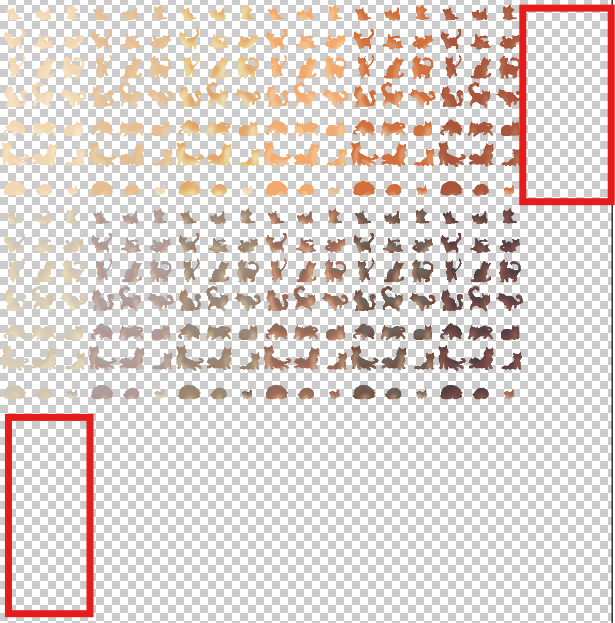
You should always keep to the left side of the canvas.
These must be properly spaced on the 50x50 grid to line up with the other sprite sets on the sheet. Spritesheets can be resized if needed to add a new set, generally if the sheet is becoming overly-wide you should add more space to the bottom of the sheet and begin a new row.
When adding a new pose...
New poses can be added to the end of the sheet or inserted at the start or middle! Width or height can be increased in increments of 50 px. Be sure to adjust the sheet_layout information in the pose_sprite_data.json file. This informs the code of how many columns and rows of sprites it should expect to find. The first number is the number of columns and second number is the rows.
If removing a pose...
If a pose needs to be removed, it can safely be removed from the spritesheet as long as the pose_sprite_data.json file's pose list is updated to match. The pose's entry in the pose list should be removed. Conversion of old saves that utilize the removed pose will be handled automatically by the code without any extra work. There must always be at least one of each pose type to avoid errors (i.e. at least one kitten, one adolescent, one adult, ect.) Para and sick sprites should not be removed.
Adding Sprites to their DATA Sheet
Once you've completed your changes to the spritesheet, the matching DATA sheet will need to be altered. This is the last step! Once the DATA sheet is altered, the new sprites should appear in game.
Not all DATA sheets hold the same information, but they will all at least contain a spritesheet or spritesheets key and a sprite_list key. Adding a new sprite set typically only requires the alteration of the sprite_list.
The sprite_list will be a list containing multiple lists or dicts. Each list/dict represents a single row of the spritesheet, starting at the top and going down. These hold the names of each sprite set within that row, the list/dict will begin on the left side of its row and continue to the right.
If you have added your new sprite set to the end of a row, then you will locate that row's list/dict and add the name of the new set to the end. If you have created a new row, then you will need to add a new list/dict to the end of the sprite_list.
Individual DATA Sheet Information
As mentioned, some DATA sheets contain more information than others. At it's most basic, a sheet will have a spritesheet string and a sprite_list that contains a list of lists. The more intricate aspects of certain DATA sheets is detailed below.
| DATA sheet | spritesheet |
sprite_list |
|---|---|---|
eye_sprite_data |
List containing both eye spritesheets. | List containing dicts, each dict contains key:value pairs for "NAME": "color category". Allowed colors are yellow, green, or blue. |
skin_sprite_data |
Name of the spritesheet. | List of lists containing name information. |
plant_sprite_data |
Name of the spritesheet. | List of dicts, each dict contains key:value pairs for "NAME": "sprite position". Allowed sprite positions are head, body, tail, and paw. |
wild_sprite_data |
Name of the spritesheet. | List of dicts, each dict contains key:value pairs for "NAME": "sprite position". Allowed sprite positions are head, body, tail, and paw. |
scar_sprite_data |
Name of the spritesheet. | List of lists containing name information. |
scar_missing_sprite_data |
Name of the spritesheet. | List of lists containing name information. |
white_patches_mostly_sprite_data |
Name of the spritesheet. | List of lists containing name information. |
white_patches_high_sprite_data |
Name of the spritesheet. | List of lists containing name information. |
white_patches_mid_sprite_data |
Name of the spritesheet. | List of lists containing name information. |
white_patches_little_sprite_data |
Name of the spritesheet. | List of lists containing name information. |
white_patches_vitiligo_sprite_data |
Name of the spritesheet. | List of lists containing name information. |
white_patches_points_sprite_data |
Name of the spritesheet. | List of lists containing name information. |
tortie_patches_sprite_data |
Name of the spritesheet. | List of lists containing name information. |
The pelt DATA sheet is particularly complex due to how integral it is to the multiple areas of the cat's sprite. Additions to this sheet should be discussed with senior contributors beforehand, as we are rather choose-y about adding new colors or patterns to the game.
| Section | Information |
|---|---|
spritesheet |
Dict containing key:value pairs for "spritesheet name": [save file name]. |
sprite_list |
List of dicts containing key:value pairs for "NAME": "color category". Possible color categories are: white, black, ginger, and brown. |
pattern_names |
List of all pattern names. |
pattern_categories |
Dict containing key:value pairs for "category name": [save file name for all patterns within the category]. You generally should not be adding new categories. |
The pose DATA sheet is also unique.
spritesheet |
sheet_layout |
poses |
|---|---|---|
| List of all lineart-related spritesheets, such as lineart, gradients, overlays, and shaders. | List containing the columns and rows of sprites expected on the sheet. | List of pose names as they should appear in the save file. Pose index is counted starting from the top left corner of the sheet and moving left-to-right, top-to-bottom. |
Adding New Pose Names
Pose save names should not be changed unless you are prepared to handle the conversion of old saves. New poses should be added following the name convention (i.e. if you are adding a new kitten pose, call it "kitten3".) Poses are automatically compiled into lists based off the portion of their name preceding the number. So if "kitten3" was added, it would automatically be made a pose option for all kittens being generated without any extra coding work being required. This does not extend to sick and para sprites, if you plan to add those then you'll also need to do some code work.
Adding Combination Patches
White Patches
You can now combine and layer patches for more unique variations. To add a new patch combination locate sprites/dicts/white_patches_combos.json.
Each patch combination is added to a list that dictates the size of the combined patch and how it is inherited. For example, some little patches combined may still be categorized as little or, if they cover enough of the cat, they could be added as a mid patch instead. Use your best judgment in sorting.
To add a new patch combination create a list in the dict based on the following format:
"NAME": ["sizePATCH", "sizePATCH"]
The size is always in lowercase and the patch name is in uppercase. For example, the TIP patch would be added to this list as littleTIP You can add any number of patches to this list, but be conscious of how they overlap and appear in game.
Here is an example of what that looks as a full part of the dictionary. Since we have added it to the little dictionary, the game will consider it as part of the little coverage category:
Tortie Patches
Adding tortie combinations is very similar to white patch combos, but a little bit less complex as we don't need to worry about size categories. To add a new patch combination locate sprites/dicts/tortie_patches_combos.json.
This file has a dictionary in it, you can add new combinations by adding dictionary entries in the following format:
"NAME": ["PATCH", "PATCH"]
The NAME is what the new combination patch will be known as in the save file information. You list the various patches being combined to create it.