Pelt Recipes and More
Overview
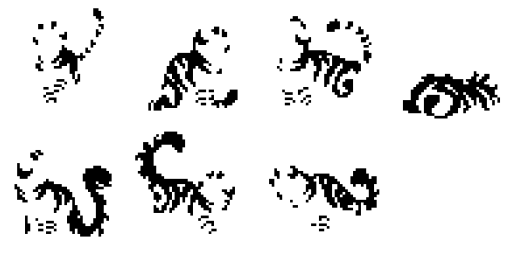
Patterns (ie, "Pelts") are built by recoloring and layering various assets. These assets are masks, and are therefore all white and transparent. Below is an example of a mask - this one showing a tabby pattern. (The normally white mask is black for visibility.)
Cat-Color Palettes
Each cat-color has a palette of colors, stored in sprites/dicts/pelt_color_palettes.json. (For clarity, these color palettes with be referred are referred to as cat-colors.) This is a dictionary of color hexcodes matched to cat-color names. The names of specific hex-code colors are arbitrary, and only referred to in the Pelt Recipes. Each cat-color should have the same list of color names, with the exception of colors only used in cat-color specific Pelt Recipe exceptions.
{
    "WHITE": {
        "base": "#EEF9FC",
        "base_gradient_bottom": "#F4FBF4",
        "base_gradient_top": "#EEF9FC",
        "pattern": "#C8D9DE",
        "pattern_gradient_top": "#95A9AF",
        "pattern_fill": "#D0DEE1",
        "masked_light_pattern": "#F4FBF6",

        "newborn_base": "#EEF9FC",
        "newborn_base_gradient_bottom": "#F3FBF7",
        "newborn_base_gradient_top": "#F3FBF7",
        ...
},
    "PALEGREY": {
        "base": "#C2D5D3",
        "base_gradient_bottom": "#DEE4D0",
        "base_gradient_top": "#C2D5D3",
        "pattern": "#8EA7A7",
        "pattern_gradient_top": "#677E7E",
        "pattern_fill": "#A2B1B0",
        "masked_light_pattern": "#E5EFE3",

        "newborn_base": "#C2D5D3",
        "newborn_base_gradient_bottom": "#D6E0D4",
        "newborn_base_gradient_top": "#D6E0D4",
        ...
    }
}
Pelt Recipes
The real meat and potatoes! Pelt recipes tell ClanGen how to put together patterns using the various pelt-part masks and color palettes. These are JSONs, all stored in sprites/dicts/pelt_recipes. A file should contain one recipe which describes how to build one pelt.
For Pelt Recipes:
| Pelt Recipe Property Name | Description |
|---|---|
name |
Required. Name of the pelt pecipe |
layer_order |
Required. List defining the layer order, from the bottom to the top, using the layer names defined in layers. Supports compound layers. |
layers |
Dictionary of layers names and layer definitions (See below table for more info). |
exceptions |
List of special pelt recipe exceptions for poses and/or color (See below for more info). |
For Layer Defintions:
| Layer Defintion Property Name | Description |
|---|---|
| The dictionary key | Name of the layer, for use in layer_order. Can be an arbitrary string. |
group_name |
The name of the pelt part mask. group_name or pelt_name is required. |
blend_mode |
The blendmode for the layer. Options: "mask", "mulitply", or "normal". Default: "normal". |
color |
Re-colors the pelt part mask to this color. You must use a color defined in the pelt color palettes. Optional. |
spritesheet |
The name of the spritesheet to look for group_name in. Default: "pelt_parts_masks" |
Alternatively, layers can can reference another pelt recipe.
| Layer Defintion Property Name | Description |
|---|---|
pelt_name |
Name of a pelt recipe. group_name or pelt_name is required. |
palette |
Name of the cat-color palette to use for pelt_name. |
Let's take a look at a simple example - The SingleColourRecipe:
{
    "name": "SingleColourRecipe",
    "layer_order": ["1", "2", "3"],
    "layers": {
        "3": {
            "group_name": "SIMPLETOPGRAD",
            "color": "base_gradient_top"
        },
        "2": {
            "group_name": "SIMPLEBOTTOMGRAD",
            "color": "base_gradient_bottom"
        },
        "1":
        {
            "group_name": "BASEMASK",
            "color": "base"
        }
    },
    "exceptions": []
}
First, we define name. These must be unique for each recipe. Use the convention {PatternName}Recipe.
Secondly, we define layer_order. This is the order the layers will be built. The first entry is the bottom layer, and it builds up from there. You can also have compound layers. They will be constructed first, then layered. Like below:
In this case, layers "2" and "3" will be constructed together, then laid onto "1". You can have as many compound-layer-within-compound-layers as you want. This may not seem useful - but it is! Most importantly when combined with blendmodes. If you add a layer with the "mask" blendmode at the end of the compound layer you can mask the layers within without effecting those outside.
You may specify a compound layer blendmode and/or opacity by adding a special entry to the end of the compound order list. This blendmode will be applied when the compound layer is added to the layer stack. This must start with "+". See below:
"layer_order": ["1", ["2", "3", "+blend_mode:mask,opacity:50"]],

OR

"layer_order": ["1", ["2", "3", "+opacity:50"]],

OR

"layer_order": ["1", ["2", "3", "+blend_mode:mask"]]"
Thirdly, you define layers.
"1" : {
    "group_name": "BASEMASK", #Required
    "color": "base", # Optional.
    "blend_mode": "normal" # Optional. Can be - multiply, mask, normal
    "opacity": 100 # Optional. Default - 100.
    "spritesheet": pelt_parts_masks # Optional. Default: pelt_parts_masks
}
First, you have to define a name for the layer. In this case, the layer's name is "1". These names are arbitrary strings, so they can be named however you like.
Each layer must have, at minimum, a group_name to specify which pelt-part will be used. (See further down for all the pelt-parts and names).
You can also have a color. This is a color-name, as defined in the color palettes. The pelt-part will be recolored to this color.
blend_mode refers to the mode in which the flat is applied. Right now there are three blend modes implemented. First, "mask", which is pygame's pygame.BLEND_MULT_RGBA blend mode. This is most commonly used when the layer is a mask, i.e. when it serves to restrict the visible pixels of the layer below to only the ones in the current layer. Secondly, "multiply", which is the normal "multiply" blend mode you can find in any art program. Finally, "normal", which is normal.
opacity is optional, but allows you to define an opacity of a layer.
spritesheet is optional. This is the spritesheet to look for group_name in. Most helpful for tortie patches, which are in "patches_tortie".
You can also use layers to refer to other pelt recipes. This will build the layer using that pelt's recipe, and some defined color palette.
And finally, for "group_name", "color", "pelt_name" or "palette", you can refer to values stored in a cat's Pelt. When doing this, use the name of the value surrounded by curly brackets {}. For example:
This is most useful for Torties, recipe below:
{
"name": "TortieRecipe",
"layer_order": ["1", ["2", "3"]],
"layers": {
"3": {
"group_name": "{tortie_marking}",
"blend_mode": "mask",
"spritesheet": "patches_tortie"
},
"2": {
"pelt_name": "{tortie_pattern}",
"palette": "{tortie_colour}"
},
"1": {
    "pelt_name": "{tortie_base}",
    "palette": "{colour}"
}
},
exceptions: []
}
Pelt Exceptions
| Exception Property Name | Description |
|---|---|
colors |
List of colors for the exception to apply to. colors or poses are required. |
layer_order |
Layer order for the exception. |
layers |
Dictionary of layers names and layer definitions for the exception. Exception layers with the same name as base recipe layers will have their dictionaries merged. |
Exceptions are for are specific cat-colors and poses, but are optional. This allows certain cat-colors and poses to have special rules for building the pelt. You can override the layer_order, or modify the defined layers. Note that "layers" doesn't fully replace the global "layers" definitions, only modifies them. Layers with the same name will have their dictionaries merged.
In order for the exception to apply, the cat must match at least one cat-color condition, AND one pose condition, if both are provided. Otherwise, if only poses OR cat-colors are provides, it must match at least one.
The below example modifies a layer for newborn cats (of any color), removes a layer for WHITE cats (of any pose), and adds a layer for newborn cats who are GRAY or PALEGRAY.
Only one exception is applied at a time. If a cat matches more than one exception, the exception with the most constraints is chosen.
"exceptions": [
        {
            "poses": ["newborn0", "newborn1", "newborn2"],
            "layers":{
                "1":{
                    "color": "base_1"
                }
            }
        },
        {
            "colors": "WHITE",
            "layer_order":["1", "3"]
        },
        {
            "colors": ["GRAY", "PALEGRAY"],
            "poses": ["newborn0", "newborn1", "newborn2"],
            "layer_order":["1", "2", "3", "4"],
            "layers":
            {
                "4":
                    {
                        "groupname": "SIMPLEBOTTOMGRAD",
                        "color": "shade_1",
                        "opacity": 50,
                        "blend_mode": "normal"
                    }
            }
        }
    ]
Pelts to Recipe Dictionary
sprites/dicts/pelt_to_recipe.json links pelt recipes with the pelt names used for cats. A recipe can be assigned to muliple cat pelt-names.
{
    "Tortie": "TortieRecipe",
    "Calico": "TortieRecipe",
    "Classic": "ClassicRecipe",
    "SingleColour": "SingleColourRecipe",
    "Single": "SingleColourRecipe",
    "TwoColour": "SingleColourRecipe",
    "Tabby": "TabbyRecipe",
    "Ticked": "TickedRecipe",
    "Mackerel": "MackerelRecipe",
    "Sokoke": "SokokeRecipe",
    "Agouti": "AgoutiRecipe",
    "Speckled": "SpeckledRecipe",
    "Rosette": "RosetteRecipe",
    "Freckled": "FreckledRecipe",
    "Smoke": "SmokeRecipe",
    "Singlestripe": "SinglestripeRecipe",
    "Bengal": "BengalRecipe",
    "Marbled": "MarbledRecipe",
    "Masked": "MaskedRecipe"
}
You might notice that "Single" isn't a pelt. What's up with that? Before this rework, Torties would generate tortie_base or tortie_pattern of "single" for the basic, SingleColour coat. This line allows old torties to still work without save-file conversion. It will not be used for any newly generated torties.